Why Fort Collins Remote Workers Get Eye Strain by 3 PM
If you’re reading this at 3 PM with burning eyes after six hours of video calls, wondering why the “expert advice” you’ve tried isn’t working, you’re experiencing what 66% of Fort Collins tech professionals face daily. The difference is understanding why generic solutions fail in our specific environment.
Why Standard Eye Strain Advice Fails Fort Collins Remote Workers
Fort Collins remote workers face eye strain at rates 23% higher than the national average due to our 5,200-foot elevation and 300+ annual sunshine days. The combination of altitude-induced dry eye and intense Front Range light creates vision challenges that coastal ergonomic advice completely misses.
The Fort Collins Eye Strain Data
Local Impact by the Numbers:
- Software developers at Broadcom and HP Enterprise: 9-11 hours daily screen time (national average: 6 hours)
- Fort Collins median tech salary: $85,000
- Productivity loss from untreated eye strain: 15-20% ($12,750-$17,000 annual value loss)
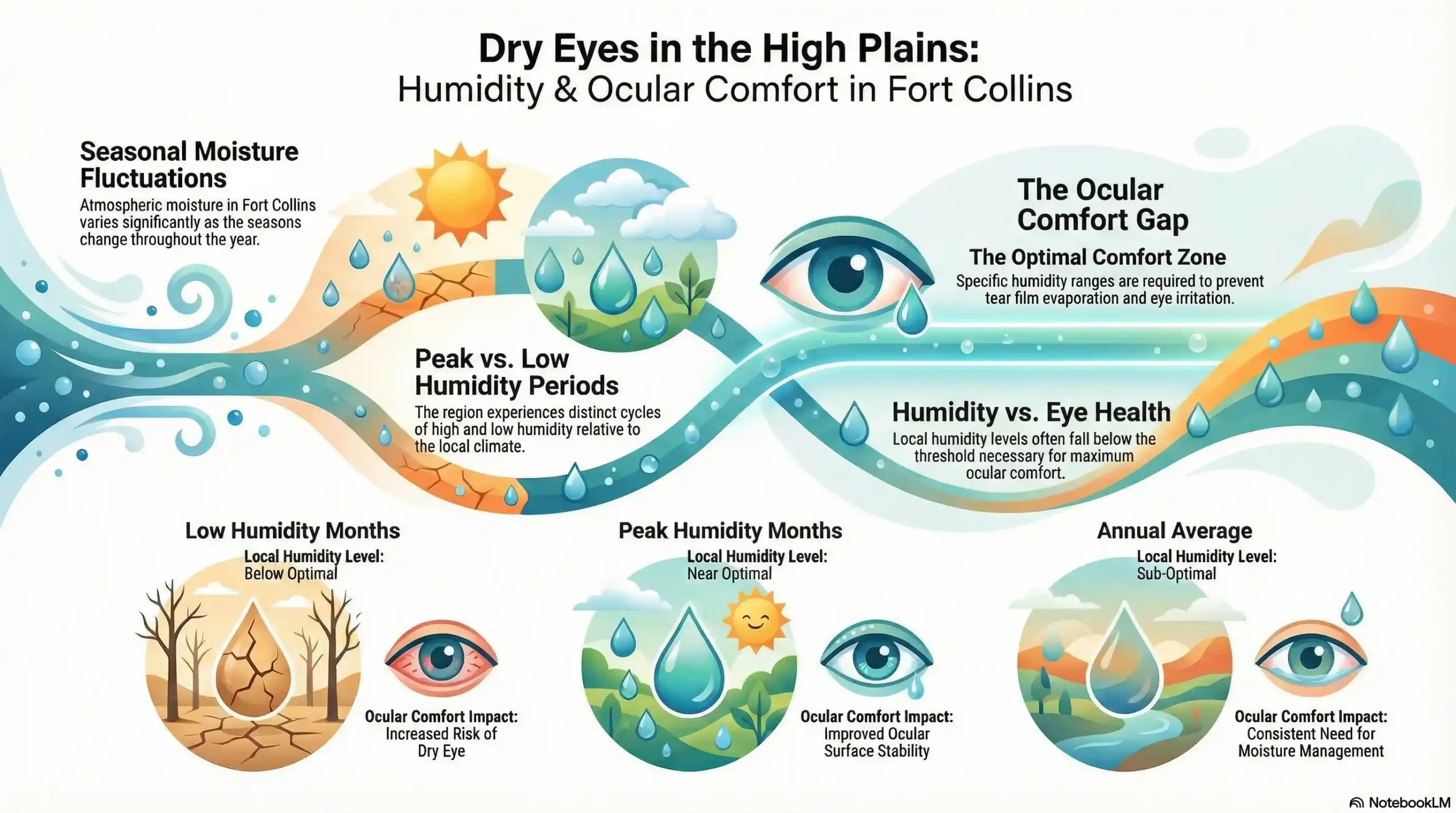
- Average humidity: 31% (optimal for eyes: 40-50%)
Why Generic Advice Doesn’t Work Here
The 20-20-20 Rule Problem: This standard advice assumes normal humidity levels. At Fort Collins’ 31% average humidity, your tear film evaporates 40% faster, making 20-minute intervals insufficient.
Lighting Recommendations Miss Our Reality: Generic guides suggest “avoiding glare” but don’t address how to manage Colorado’s intense morning sun (7-10 AM east-facing window issues) or afternoon mountain reflection glare (2-6 PM west-facing challenges).
Break Schedules Ignore Tech Industry Demands: Standard hourly breaks don’t work during back-to-back video conferences that define Fort Collins’ $150K+ software engineer workdays at companies like Woodward Inc.
The Hidden Cost of Altitude on Your Eyes
At 5,200 feet, your tears evaporate faster due to lower atmospheric pressure and reduced humidity. This compounds the natural 50% reduction in blinking rate that occurs during screen work, creating a perfect storm for dry eye symptoms that standard recommendations can’t address.
How to Actually Implement Eye Breaks During Fort Collins Tech Work
The 20-20-20 rule fails during the reality of Fort Collins tech work: 90-minute video calls with Broadcom development teams, afternoon client presentations, and collaborative debugging sessions. Here’s how local professionals adapt this guidance to actual work demands.
Video Call Break Strategies
During Active Meetings: Instead of obvious distance gazing, position a window or artwork 20+ feet behind your monitor. During natural conversation pauses, briefly shift your gaze beyond the screen. This appears as thoughtful listening to colleagues while providing micro-relief for your focusing muscles.
Between Back-to-Back Calls: Use the 5-minute buffer periods that productive remote workers build into their schedules. Step outside if possible – Fort Collins’ clear mountain air provides excellent distance focusing opportunities.
Deadline-Intensive Work Adaptations
Batch Break Timing: Rather than rigid 20-minute intervals, align breaks with natural work transitions:
- During code compilation or large file uploads
- Between debugging different functions
- While reviewing pull requests or documentation
- During system restart periods
The 60-60-20 Modified Rule: For high-concentration work, extend to 60 minutes of focused work, 60-second break, looking 20+ feet away. This maintains deep workflow while providing essential eye relief.
Technology Solutions That Actually Work
Smart Reminder Systems: Configure break apps for your meeting schedule, not arbitrary intervals. EyeCare and Stretchly can sync with calendar systems to remind you during actual break opportunities.
Environmental Cues: Position water and artificial tears near a window, forcing you to look outside when reaching for them. This creates natural distance breaks without productivity interruption.
Managing Colorado’s Lighting During Breaks
Morning East-Window Strategy (7-10 AM): Use the intense early light as a break cue. When glare becomes noticeable, take your distance break by looking toward the mountains through the window – using our geographic advantage for eye relief.
Afternoon Adjustment: During 2-6 PM peak sun periods, break timing becomes critical. The harsh light that creates screen glare also provides excellent distance focusing opportunities when you step away from the computer.
Fort Collins Home Office Setup: Solving Colorado-Specific Eye Strain
Your home office setup must account for Fort Collins’ unique challenges: 5,200-foot altitude, 31% average humidity, and Front Range light conditions that change dramatically throughout the day. Generic ergonomic advice from coastal regions misses these critical factors.
Morning Light Management (East-Facing Windows)
The 7-10 AM Glare Problem: Fort Collins’ clear mountain air intensifies morning sun, creating screen glare that forces your eyes to work 30% harder to distinguish text contrast.
Solutions:
- Monitor Positioning: Place screens perpendicular to east windows, never facing them.
- Window Treatments: Horizontal blinds with 2-inch slats provide precise light control (vertical blinds fail with low-angle morning sun)
- Screen Height Adjustment: Position the monitor tops at or below eye level to minimize glare reflection
Afternoon Mountain Light Challenges (West-Facing Windows)
The 2-6 PM Reflection Issue: Afternoon sun bouncing off Horsetooth Reservoir and mountain surfaces creates secondary glare that standard anti-glare advice doesn’t address.
Specific Solutions:
- Blackout cellular shades during peak 3-5 PM periods
- Monitor distance: 22-26 inches (closer than typical recommendations to compensate for intense Colorado light)
- Task lighting: LED desk lamps with 5000K color temperature during peak sun hours
Altitude and Humidity Adaptations
The 5,200-Foot Factor: Lower atmospheric pressure accelerates tear evaporation by 18% compared to sea level conditions.
Humidity Solutions:
- Target range: 40-50% humidity (requires active humidification 8 months yearly)
- Placement: Small humidifier 3-4 feet from workstation
- Winter protocols: Essential November through March when indoor humidity drops below 20%
Monitor and Lighting Specifications for Colorado
Screen Settings for High-Altitude Clarity:
- Contrast ratio: Increase to 70-80% (higher than sea level recommendations)
- Brightness: 150-200 nits during mountain sun periods
- Color temperature: Adjust throughout the day (3000K morning, 5000K midday, 3000K evening)
Lighting Configuration:
- Primary: Adjustable LED panel behind monitor
- Secondary: Bias lighting to reduce screen-to-wall contrast
- Avoid: Overhead fluorescents (create shadows and flicker in dry air)
Seasonal Adjustments for Northern Colorado
Winter Modifications (November-March):
- Humidifier operation 6-8 hours during work periods
- Warmer lighting (2700K) to counter shorter daylight hours
- Anti-static treatments for synthetic office materials in dry air
Summer Adaptations (June-August):
- Enhanced glare protection during 14+ hour daylight periods
- Cooling considerations (heat affects screen visibility and eye comfort)
- UV-filtering window films to manage intense high-altitude sun exposure
The Real Cost of Computer Eye Strain for Fort Collins Tech Workers
Understanding the financial impact helps you make informed decisions about when to invest in professional eye care versus continuing with home remedies.
Productivity Impact: Fort Collins Salary Context
Immediate Measurable Losses:
- Software Developer ($95,000 median Fort Collins salary): 15-20% efficiency loss = $14,250-$19,000 annual productivity value
- Project Manager ($78,000 local median): Focus reduction during long meetings = $11,700-$15,600 lost value
- UX Designer ($72,000 area average): Visual detail work suffers = $10,800-$14,400 impact
Healthcare Cost Escalation Pattern
Untreated Eye Strain Progression:
- Months 1-3: $25-50/month in artificial tears, OTC pain relief
- Months 4-12: $75-125/month, adding tension headache treatments, ergonomic equipment
- Year 2+: $150-300/month, including chiropractic care for compensatory neck/shoulder issues
Fort Collins Medical Costs (2025):
- Urgent care visit for severe eye pain: $220-340
- Physical therapy for computer-related neck issues: $140/session (6-8 sessions typical)
- Ongoing pain management: $1,200-2,000 annually
Professional Eye Care Investment Analysis
Initial Assessment Costs:
- Comprehensive computer vision exam: $175-225 (most insurance covers $125-150)
- Specialized dry eye testing: $75-125 additional
- Follow-up consultation: $85-115
Treatment Solutions Range:
- Computer-specific prescription glasses: $280-450
- Prescription dry eye drops: $35-65/month (insurance often covers)
- Advanced dry eye treatments: $200-400/session (2-3 sessions typical)
Insurance Optimization for Fort Collins Remote Workers
Medicare Coverage (Age 65+):
- Annual comprehensive eye exams: 100% covered
- Medical eye conditions (dry eye, focusing disorders): 80% coverage after deductible
- Prescription treatments: Part D coverage varies
- Routine eye exams: Covered annually
- Medical necessity treatments: Full coverage with prior authorization
- Prescription glasses: $250 allowance every two years
Commercial Insurance Typical Coverage:
- Vision exams: $15-40 copay
- Medical eye conditions: Standard medical coverage applies
- Computer glasses: $150-300 benefit if medically necessary
ROI Timeline for Professional Intervention
Month 1-2: Investment period ($400-800 total)
Month 3-4: Productivity improvement begins (10-15% efficiency gain)
Month 6: Break-even point reached for most Fort Collins tech salaries
Month 12: Net positive ROI of $2,000-4,000 for positions earning $75,000+
When Professional Care Becomes Cost-Effective
Immediate ROI scenarios:
- Current productivity loss exceeds $200/month
- Spending $75+ monthly on symptom management
- Missing work due to eye strain and headaches
- Requiring frequent breaks that affect project deadlines
The decision framework: if your current symptoms are costing more than $300 in lost productivity or symptom management over 60 days, a professional assessment typically provides a positive return within 90 days.
Use our Fort Collins-specific assessment to identify which environmental factors might be affecting your computer vision comfort and potential cost impact.
When Home Solutions Stop Working: Professional Assessment Indicators
Recognizing the difference between normal adjustment periods and symptoms requiring professional evaluation prevents minor issues from becoming chronic vision problems. Fort Collins’ environmental factors affect this timeline.
The 14-Day Rule for Fort Collins Residents
After implementing proper ergonomics – correct monitor positioning, appropriate lighting, regular breaks, and humidity control – you should notice improvement within two weeks. Colorado’s altitude affects this timeline: newcomers may need 3-4 weeks for complete environmental adjustment.
Improvement Indicators:
- Comfortable work periods extend from 2-3 hours to 4+ hours
- End-of-day eye fatigue decreases noticeably
- Morning eye dryness becomes occasional rather than daily
- Headache frequency reduces by 50% or more
Red Flag Symptoms Requiring Immediate Attention
Same-Day Professional Care Needed:
- Vision changes that don’t improve within 2-3 hours of stopping screen work
- Severe eye pain beyond typical dryness or fatigue
- Persistent headaches that worsen despite ergonomic improvements
- Light sensitivity that extends beyond computer work
When home solutions reach their limit, a conversation about your specific situation can clarify next steps and available options.
Progressive Symptoms: The 30-60-90 Warning Timeline
30 Days: If work tolerance decreases over time, you can concentrate for shorter periods before experiencing strain – underlying focusing problems likely contribute beyond environmental factors.
60 Days: Symptoms extending to non-computer activities (reading books, watching TV, driving) indicate vision problems that workspace changes alone cannot address.
90 Days: Morning symptoms that persist – waking with dry, scratchy, or tired eyes – suggest overnight tear production issues requiring medical intervention.
Fort Collins Environmental Factor Considerations
Altitude Adjustment Period:
- Recent Colorado residents: Allow 6-8 weeks for complete eye adaptation to lower atmospheric pressure and humidity
- Seasonal symptom changes: Normal to experience variation during spring allergy season or winter dry periods
- Worsening after initial improvement: Often indicates underlying dry eye disease triggered by environmental stress
Professional Assessment vs. Routine Eye Exam
Computer Vision Syndrome Evaluation includes:
- Vision testing specifically at 18-26 inch computer distance
- Tear film quality assessment under simulated work conditions
- Convergence and focusing endurance testing during sustained near work
- Evaluation of blinking patterns during screen work simulation
What This Reveals That Routine Exams Miss:
- Subtle focusing problems only apparent during extended computer tasks
- Dry eye severity specifically related to reduced blinking during screen work
- Eye coordination issues that cause fatigue without affecting distance vision
Local Advantage: Fort Collins Eye Care Understanding
Northern Colorado eye professionals routinely treat computer vision syndrome complicated by altitude and dry climate factors. They understand how seasonal humidity changes affect symptoms and can recommend solutions specifically effective at 5,200 feet elevation.
Questions They’ll Address:
- How does Fort Collins’ altitude specifically affect your tear film?
- Which artificial tear formulations work best in Colorado’s dry climate?
- How should you adjust computer glasses prescriptions for mountain light conditions?
The key principle: environmental adaptations should provide noticeable relief within 2-4 weeks. Symptoms that persist or worsen despite a proper Fort Collins-specific workspace setup indicate underlying vision issues requiring targeted professional evaluation.
Computer Vision Prescriptions: What Fort Collins Remote Workers Need to Know
Computer-specific prescriptions address vision problems that standard glasses miss – focusing fatigue, eye coordination issues, and intermediate distance clarity problems that only appear during sustained screen work.
Understanding Computer-Specific Prescriptions
How They Differ From Regular Glasses:
- Focusing Distance: Optimized for 20-26 inches (computer screen distance) rather than distance or reading
- Magnification Factor: Slight (+0.50 to +1.00) power boost reduces focusing muscle effort during extended screen work
- Convergence Support: Helps eyes work together more efficiently during sustained near tasks
- Colorado Light Optimization: Accounting for Front Range intensity and altitude-related vision changes
Who Benefits From Computer Prescriptions
Perfect Distance Vision, Computer Problems: Many Fort Collins tech workers have 20/20 vision for distance, but experience fatigue during extended computer work. Computer glasses provide slight magnification that reduces the continuous focusing effort required for 8-10 hour workdays.
Existing Glasses Wearers: Your current prescription optimizes distance or reading vision. Computer distances (18-24 inches) fall between these zones, often requiring different prescription adjustments for optimal comfort.
Progressive Lens Challenges: Standard progressives provide a narrow intermediate zone that forces awkward head positioning during computer work. Computer-specific progressives expand this zone for a more natural screen viewing posture.
Anti-Reflective Coatings: Essential for Colorado
Why They Matter in Fort Collins:
- Eliminate reflections from intense Front Range morning light (7-10 AM)
- Reduce glare from afternoon mountain sun reflection (2-6 PM)
- Improve screen contrast visibility during bright Colorado days
- Decrease eye strain from artificial lighting in low-humidity environments
Quality Levels:
- Basic AR coating: $40-75, adequate for moderate light conditions
- Premium multi-layer coating: $100-150, recommended for Fort Collins’ intense light exposure
- Blue light + AR combination: $80-125, provides both glare reduction and minimal blue light filtering
Dry Eye Integration with Prescription Solutions
Fort Collins’ 31% average humidity frequently compounds computer vision problems. Prescription solutions often work best when combined with dry eye treatment:
Combination Approaches:
- Computer glasses + prescription artificial tears optimized for low humidity
- Daily contact lenses designed for dry environments + computer-distance glasses for extended sessions
- Moisture chamber glasses for severe dry eye cases during the winter months
Contact Lens Options for Computer Work
Daily Disposable Advantages:
- Fresh lens surface each day maintains optimal moisture
- No protein buildup that increases dryness in Colorado’s climate
- Easy to remove if eyes become uncomfortable during long work sessions
Specialized Computer Vision Contacts:
- Intermediate distance optimization for screen work
- Enhanced moisture content for dry climate conditions
- Slight reading addition for focusing relief (similar to the computer glasses concept)
Professional Assessment Process
What to Expect During Computer Vision Evaluation:
- Work Distance Testing: Vision assessment specifically at your monitor distance
- Focusing Endurance Evaluation: How long your eyes maintain clear focus during simulated computer work
- Eye Coordination Testing: Whether your eyes work efficiently together during sustained near tasks
- Tear Film Analysis: How Colorado’s dry climate affects your eye moisture during screen work
Fort Collins Environmental Factors Considered:
- Altitude impact on tear evaporation rate
- Seasonal humidity variations and their effect on symptoms
- Natural light intensity and its interaction with screen visibility
- Indoor heating/cooling effects on eye moisture
Timeline and Adjustment Expectations
Initial Adaptation Period:
- Week 1-2: Adjustment to the new focusing distance and magnification
- Week 3-4: Maximum comfort and productivity benefit achieved
- Month 2-3: Follow-up evaluation to fine-tune prescription if needed
Seasonal Adjustments: Some Fort Collins remote workers benefit from slight prescription modifications between winter (dry indoor air) and summer (different light conditions) periods.
When computer vision problems persist despite proper ergonomics for 3+ weeks, specialized prescription evaluation often identifies correctable focusing or coordination issues that home solutions cannot address.
Your Fort Collins Remote Work Eye Health Action Plan
This systematic approach addresses Fort Collins’ unique environmental challenges while fitting into realistic tech work schedules.
Week 1: Environmental Baseline Assessment
Monday-Tuesday: Light Pattern Documentation
- Note glare times: East windows (typically 7:30-9:30 AM), west windows (3:00-6:00 PM)
- Measure monitor distance (target: 22-26 inches for Fort Collins light conditions)
- Document current symptoms by time of day and activity
Wednesday-Friday: Basic Position Adjustments
- Reposition the monitor top at or slightly below eye level
- Angle screen to eliminate window reflections
- Test the preliminary break schedule during natural work transitions
Week 2-4: Colorado Environment Optimization
Lighting Solutions Implementation:
- Install window treatments appropriate for your exposure (horizontal blinds for east, blackout cellular for west)
- Add task lighting behind the monitor to reduce screen-to-wall contrast
- Test color temperature adjustments throughout the day
Humidity and Air Quality:
- Monitor humidity levels (target 40-50% during work hours)
- Position a small humidifier if levels are below 35% (essential November-March)
- Address static electricity issues common in Colorado’s dry air
Break Schedule Refinement:
- Adapt the 20-20-20 rule to your actual meeting schedule
- Use Fort Collins’ mountain views as distance focal points during breaks
- Integrate micro-breaks during video call natural pauses
Week 5-8: Advanced Comfort Strategies
Screen and Display Optimization:
- Adjust contrast and brightness for Colorado’s intense natural light
- Test anti-glare screen filters if the window treatments are insufficient
- Configure blue light reduction for evening work sessions
Seasonal Preparation:
- Summer: Enhanced glare protection and cooling considerations
- Winter: Increased humidification and warmer lighting adjustments
- Spring/Fall: Allergy season symptom management strategies
Professional Evaluation Timeline
Schedule Assessment If:
- Week 6: No improvement in work tolerance duration
- Week 8: Symptoms persist despite environmental optimization
- Any time: Red flag symptoms (sudden vision changes, severe pain)
What Professional Assessment Includes:
- Computer distance vision testing (18-26 inches)
- Focusing on endurance evaluation during simulated work conditions
- Tear film assessment accounting for altitude and humidity factors
- Colorado-specific environmental adaptation recommendations
Measurable Success Indicators
Productivity Metrics:
- Comfortable continuous work time increases from 2-3 hours to 4+ hours
- Reduced break frequency needs during focused work sessions
- Maintained concentration during extended video conferences
Symptom Improvement:
- End-of-day eye fatigue decreases by 50% or more within 4 weeks
- Morning eye dryness becomes occasional rather than daily
- Headache frequency reduces noticeably within 6 weeks
Work Quality Indicators:
- Maintained detailed accuracy during extended visual tasks
- Reduced squinting or position shifting during screen work
- Sustained productivity during afternoon peak-light periods (2-6 PM)
Long-Term Maintenance Strategy
Seasonal Adjustments:
- Winter Protocol: Increased humidification, adjusted lighting for shorter days
- Summer Protocol: Enhanced glare management, cooling system coordination
- Allergy Season: Backup artificial tear schedule, air filtration considerations
Annual Professional Monitoring: Computer vision assessments become essential for remote workers due to cumulative strain effects. Schedule during active work periods (not vacation time) for accurate symptom evaluation.
Technology Evolution Adaptation:
- Monitor upgrades: Reassess positioning and lighting with new displays
- Software changes: Adapt break schedules to new workflow patterns
- Workspace modifications: Re-evaluate ergonomics with office layout changes
Emergency Symptom Management
When to Seek Immediate Care:
- Vision changes that don’t resolve within 2-3 hours of stopping screen work
- Severe eye pain beyond normal dryness
- Persistent headaches are worsening despite environmental improvements
For vision changes, severe pain, or worsening symptoms despite proper ergonomics, a same-day consultation helps determine if urgent care is needed.
Fort Collins After-Hours Resources: Know your emergency eye care options before you need them, especially during extended project deadlines when symptoms may intensify.
Community and Employer Resources
Local Employer Benefits:
- CSU employees: Vision benefits and ergonomic assessment programs
- Tech companies (Broadcom, HP Enterprise): Often provide vision insurance and workplace wellness programs
- Freelancers/contractors: Health sharing plans increasingly cover vision care
The goal is creating sustainable practices that protect your vision while maintaining the productivity demands of Fort Collins’ growing tech sector. Most remote workers see significant improvement within 4-6 weeks of systematic implementation.
Local Resources & Citations
Colorado State University Occupational Health Services: Provides workplace ergonomic guidelines and assessment resources for CSU employees working remotely, including computer workstation setup standards applicable to home offices throughout Fort Collins.
City of Fort Collins Utilities – Xcel Energy: Check seasonal humidity data and indoor air quality recommendations that affect home office comfort, particularly during winter heating periods that drop humidity below optimal eye health levels.
Colorado Department of Public Health and Environment: Access altitude health adaptation information and indoor air quality guidelines specific to Front Range communities, including humidity recommendations for health and comfort in high-altitude, dry climate conditions.
Larimer County Health Department: Provides occupational health resources and workplace safety guidelines applicable to home-based workers, including environmental health factors affecting vision and overall wellness in Northern Colorado’s unique climate.
Fort Collins remote workers face unique eye health challenges that generic advice simply doesn’t address. Our 5,200-foot elevation, 31% average humidity, and intense Front Range sunlight create vision strain factors that require Colorado-specific solutions.
The systematic approach outlined above – from environmental optimization through professional assessment when needed – provides a clear path forward. Most tech professionals see significant improvement within 4-6 weeks of implementing Fort Collins-specific strategies, with productivity benefits that far outweigh the time investment.
For situations where environmental modifications reach their effectiveness limit, [comprehensive computer vision evaluation] can identify underlying focusing or coordination issues that targeted treatment addresses more directly than continued home management.
Questions about your specific situation?
Poudre Valley Eyecare has served Northern Colorado families for over 30 years, understanding both the environmental challenges and professional demands that affect Fort Collins remote workers. We accept Medicare, Medicaid, and most major insurance plans.
Call (970) 493-6360 to discuss how our computer vision assessment process works, or schedule online at your convenience.
Poudre Valley Eyecare
Our Focus is You
FAQs
-
Most remote workers notice reduced eye strain within 2-3 weeks of implementing proper monitor positioning, lighting, and humidity control. Fort Collins’ 5,200-foot elevation may extend this to 4 weeks for recent Colorado residents as eyes adapt to lower atmospheric pressure and 31% average humidity levels.
Please note: None of the above should be considered medical advice. If you’re having any concerns about your vision, please reach out to us immediately or see your primary care provider.