Working from Home Eye Strain: Remote Worker’s Complete Guide
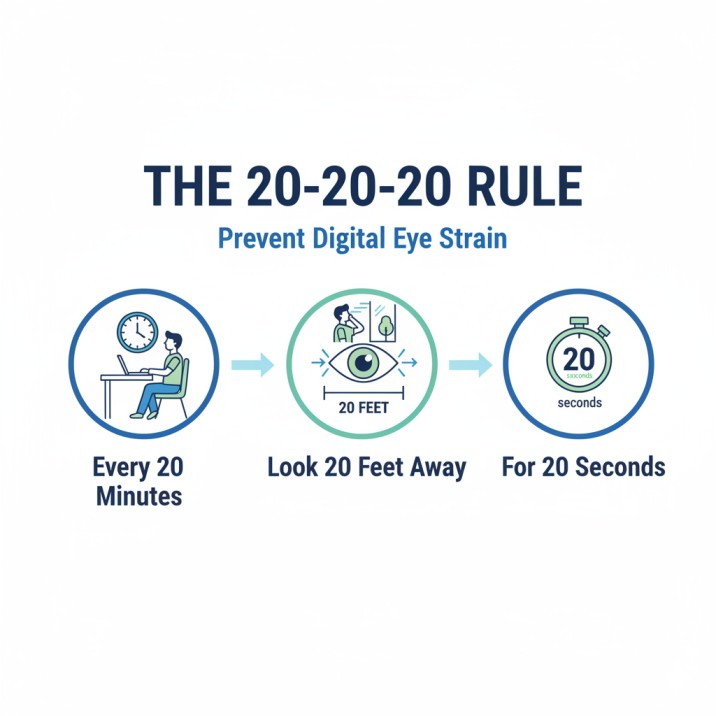
Working from home has increased global cases of Computer Vision Syndrome (CVS) to 69%, with remote workers experiencing 25% more severe eye strain than office-based peers. To stop digital eye strain immediately, you must optimize your workstation ergonomics and follow the 20-20-20 rule: every 20 minutes, look at something 20 feet away for 20 seconds. This guide provides the 2025 clinical roadmap for eliminating headaches, blurred vision, and dry eyes caused by remote screen use.
Understanding Computer Vision Syndrome in Remote Workers
Computer vision syndrome (CVS) encompasses a range of eye and vision-related problems that result from prolonged digital device use. According to the largest meta-analysis conducted in 2024, which reviewed 103 studies involving 66,577 participants, CVS now affects 69% of the global population. For remote workers, this condition has become particularly problematic due to the unique challenges of working in home environments.
What Makes Remote Work Different for Your Eyes
Unlike traditional office settings with professionally designed workspaces, home offices often lack proper ergonomic setup and lighting. Remote workers typically experience:
- Longer continuous screen time without natural break opportunities that occur in office environments
- Poor home office ergonomics with inadequate lighting and improper viewing distances
- Reduced blinking rates leading to dry eye symptoms and increased eye strain
- Multiple device usage, switching between laptops, monitors, tablets, and smartphones throughout the day
The Science Behind Digital Eye Strain
When you stare at a computer screen, your eyes must constantly refocus to process the pixelated images and text. Unlike printed material, digital screens emit light directly into your eyes while displaying images made of tiny dots called pixels. This forces your eyes to work harder to maintain focus and clarity.
Additionally, the blue light emitted by digital screens can disrupt your natural sleep-wake cycle and contribute to eye fatigue. While research on blue light’s long-term effects continues, the immediate impact on comfort and sleep quality is well-documented.
Recognizing Digital Eye Strain Symptoms
Digital eye strain manifests through various symptoms that can significantly impact work productivity and quality of life. Recent studies show that remote workers experience 25% more severe symptoms compared to office workers due to prolonged home-based screen time.
Primary Visual Symptoms
Eye Fatigue and Strain
The most common complaint among remote workers is persistent eye fatigue, characterized by tired, heavy eyes, especially after extended work sessions. This occurs because digital screens force your eyes to work harder than when viewing printed materials.
Blurred Vision and Focus Problems
Many remote workers experience intermittent blurred vision, particularly when switching focus between screens and distant objects. This happens because prolonged screen use can temporarily affect your eye’s focusing muscles, leading to accommodative dysfunction.
Dry Eyes and Reduced Blinking
Screen work dramatically reduces your blink rate—from a normal 15-20 blinks per minute to just 4-7 blinks per minute during computer use. This reduction leads to dry eyes, which can also cause excessive tearing as your eyes attempt to compensate.
Double Vision
Some remote workers experience diplopia, or double vision, especially when tired. This occurs when your eye muscles struggle to maintain proper alignment after prolonged screen use.
Secondary Physical Symptoms
Headaches
Digital eye strain commonly triggers headaches, particularly tension headaches around the temples and forehead. These headaches often develop gradually throughout the workday and may persist after work hours.
Neck and Shoulder Pain
Poor ergonomics in home office setups frequently cause remote workers to crane their necks or hunch forward, leading to musculoskeletal pain that compounds eye strain symptoms.
Light Sensitivity
Extended screen exposure can make your eyes more sensitive to bright lights, causing discomfort when transitioning between indoor and outdoor environments.
The Hidden Productivity Cost
Research from the University of Alabama, Birmingham School of Optometry, reveals that computer users with uncorrected refractive errors can experience productivity reductions of up to 20%. For remote workers experiencing computer vision syndrome, this translates to:
- Decreased work quality due to difficulty maintaining visual focus during detailed tasks
- Longer task completion times as eyes struggle to maintain clarity throughout the workday
- Increased error rates from visual fatigue affecting attention to detail
- Reduced work stamina, leading to earlier onset of fatigue and decreased afternoon productivity
Creating an Eye-Friendly Home Office
Your workspace ergonomics play a crucial role in preventing computer vision syndrome. Research shows that proper setup can reduce eye strain symptoms by up to 60% within the first week of implementation.
Optimal Screen Positioning
Distance and Viewing Angles
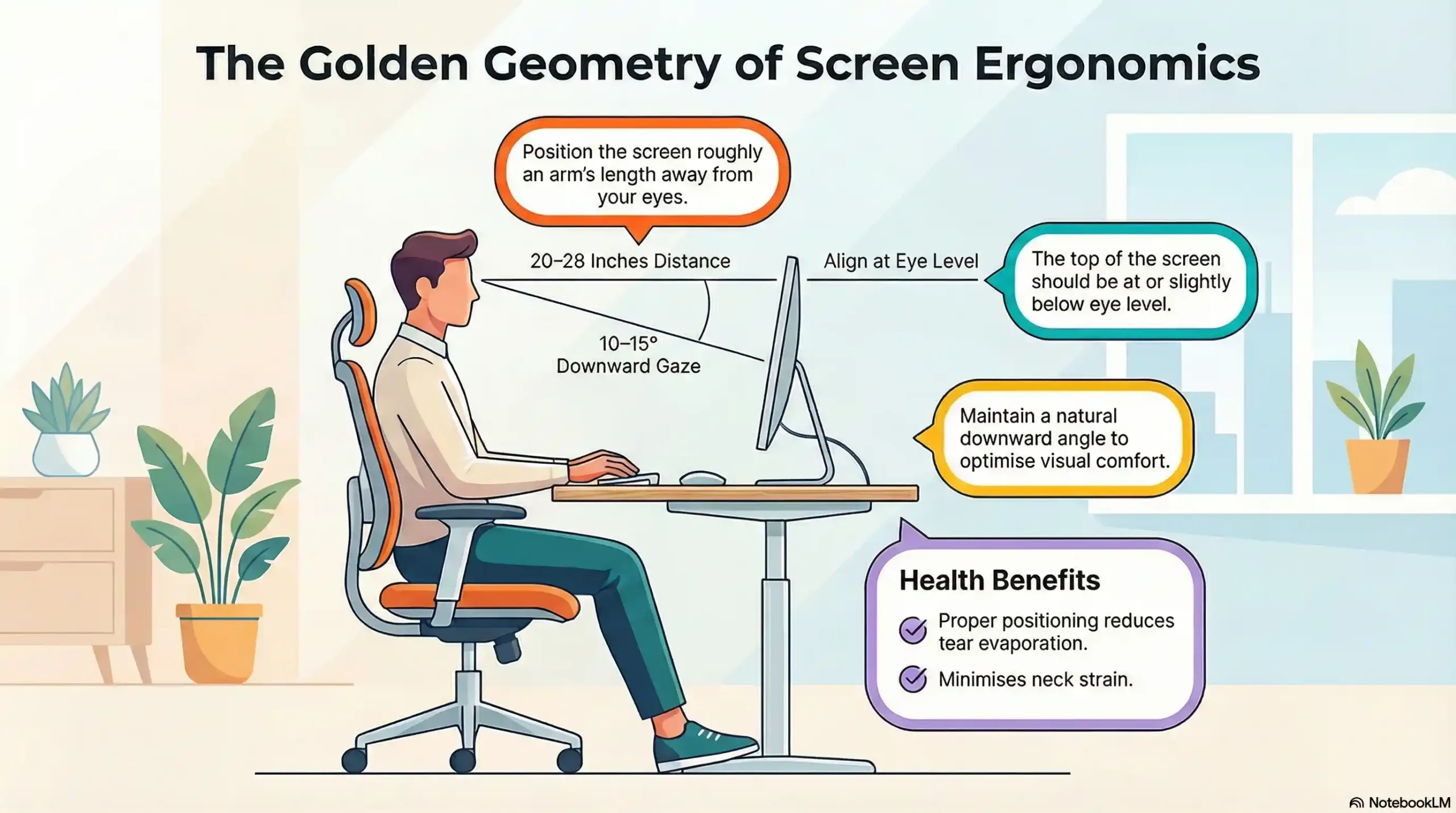
Position your monitor 20-28 inches from your eyes—roughly an arm’s length away. The top of your screen should be at or slightly below eye level, creating a natural downward gaze of 10-15 degrees. This positioning reduces tear evaporation and minimizes neck strain while optimizing visual comfort.
Multiple Monitor Setup
If you use multiple monitors, position them at the same distance and height to prevent constant refocusing. The secondary monitor should be angled slightly toward your primary viewing position.
Screen Setup Guidelines
| Setup Element | Recommended Distance/Position | Eye Health Benefit |
|---|---|---|
| Monitor Distance | 20-28 inches (arm’s length) | Reduces focusing strain |
| Screen Height | Top at or below eye level | Minimizes neck strain |
| Viewing Angle | 10-15 degrees downward | Reduces tear evaporation |
Lighting Solutions That Work
Ambient Lighting Principles
Your room’s lighting should be approximately half as bright as typical office lighting. Avoid working in dark rooms with only your screen providing light, as this creates harsh contrast that strains your eyes.
Reducing Screen Glare
Position your monitor perpendicular to windows to minimize glare. If window placement isn’t adjustable, use adjustable blinds or curtains to control natural light. Consider an anti-glare monitor filter for additional protection.
Task Lighting Options
Use adjustable desk lamps positioned behind or beside your monitor to provide even, indirect lighting. LED lamps with adjustable color temperature allow you to match lighting conditions throughout the day.
Book a Comprehensive Digital Eye Strain Exam in Fort Collins
Air Quality and Humidity
Managing Dry Air
Home heating and air conditioning systems can create dry air that exacerbates eye dryness. Consider using a humidifier to maintain 30-50% humidity in your workspace.
Avoiding Air Currents
Position your desk away from direct airflow from vents, fans, or air conditioning units, as moving air increases tear evaporation.
The 20-20-20 Rule and Evidence-Based Break Strategies
The 20-20-20 rule remains the gold standard for digital eye strain prevention. Clinical studies demonstrate that consistent application of this rule can reduce eye strain symptoms by up to 50% within two weeks of implementation.
Enhanced Break Strategies for 2025
Recent research has identified enhanced versions of the traditional 20-20-20 rule that provide even greater benefits for remote workers:
The 20-20-20-2 Rule
Add 2 seconds of deliberate blinking during your 20-second break to help rewet your eyes and improve tear film distribution.
The 20-20-20-20 Rule
Include 20 seconds of neck and shoulder stretching during your eye break to address postural issues that contribute to overall visual discomfort.
Break Reminder Systems
Technology Solutions
- Use apps like EyeCare Plus, Stretchly, or Time Out to automate break reminders.
- Enable focus modes on devices to limit notification distractions
- Set calendar reminders for longer breaks every hour
Natural Break Integration
- Schedule phone calls for walking breaks
- Use a distant water source to encourage movement
- Plan brief outdoor activities between meetings
Active Rest Techniques
Eye Exercises
- Focus Shifting: Alternate focus between near (6 inches) and far (20+ feet) objects
- Eye Circles: Slowly roll your eyes in complete circles to relax muscles
- Palming: Cover closed eyes with palms for 30 seconds to provide complete rest
Blinking Exercises
Practice deliberate, slow blinking for 10-15 seconds to help redistribute tear film and moisturize eyes. Remember that normal blinking should occur 15-20 times per minute, but during screen use, this can drop to just 4-7 blinks per minute.
Technology Solutions for Digital Eye Strain
Modern technology offers sophisticated tools to help reduce computer vision syndrome while maintaining peak productivity. The key is selecting evidence-based solutions that have been clinically validated.
Screen Settings and Adjustments
Brightness and Contrast Optimization: Adjust your screen brightness to match your surrounding environment. Your monitor should not appear as a light source in a dim room, nor should it appear washed out in bright conditions. Optimal contrast ratios should be 3:1 or higher between text and background.
Text Size and Font Selection: Increase font size to at least 12-14 points to reduce squinting. Sans-serif fonts like Arial, Verdana, or Tahoma are typically easier to read on screens than serif fonts like Times New Roman.
Dark Mode Benefits
Use dark mode when available, especially in low-light conditions. Dark backgrounds with light text can reduce overall screen brightness while maintaining readability.
Blue Light Management
Built-in Blue Light Filters
Most devices now include blue light reduction features:
- Windows: Night Light mode
- macOS: Night Shift
- Mobile devices: Blue light filters in display settings
Third-Party Applications
Applications like f.lux or Iris automatically adjust screen color temperature based on time of day, reducing blue light exposure in evening hours.
Blue Light Filtering Glasses
While research on blue light glasses shows mixed results, many users report subjective comfort improvements. If considering blue light glasses, consult with an eye care professional for personalized recommendations.
Productivity Apps for Eye Health
Break Reminder Apps
- Stretchly: Open-source break reminder with customizable intervals
- EyeCare Plus: Specifically designed for eye strain prevention
- Time Out: Mac-specific application with flexible break scheduling
Screen Time Monitoring
Track your daily screen time to understand usage patterns and identify opportunities for reduction.
Professional Eye Care Solutions
While many cases of computer vision syndrome can be managed with environmental and behavioral changes, some situations require professional intervention from qualified eye care professionals.
When to Seek Professional Eye Care
Schedule a comprehensive eye examination if you experience any of the following warning signs:
- Persistent symptoms that continue despite implementing preventive measures for 2-3 weeks
- Vision changes, including sudden blurriness, persistent double vision, or loss of peripheral vision
- Severe discomfort that interferes with daily activities, sleep, or causes debilitating headaches
- Productivity impact where eye strain significantly affects work performance or quality of life
What to Expect from an Eye Exam
Comprehensive Assessment
A computer vision syndrome evaluation typically includes:
- Visual acuity testing at multiple distances
- Eye muscle coordination assessment
- Dry eye evaluation
- Refractive error measurement
- Digital device usage history review
Potential Treatments
Based on your examination, your eye care professional may recommend:
- Prescription computer glasses with anti-reflective coating
- Vision therapy exercises to improve focus and coordination
- Artificial tear drops for dry eye management
- Prescription adjustments for existing eyewear
Specialized Computer Vision Solutions
Computer-Specific Prescriptions
Some people benefit from glasses specifically designed for computer work, even if they don’t need correction for distance vision. These may include slight magnification or focusing assistance for intermediate distances.
Progressive Lens Adjustments
For those over 40 experiencing presbyopia, computer-specific progressive lenses can provide more comfortable intermediate vision than standard progressive designs.
Long-Term Eye Health Strategies
Protecting your vision while working remotely requires a long-term approach that addresses both immediate symptoms and future eye health.
Nutrition for Eye Health
Key Nutrients for Vision
- Omega-3 fatty acids: Found in fish, flaxseed, and walnuts, support tear production
- Lutein and zeaxanthin, Present in leafy greens, help filter harmful blue light.
- Vitamin E and C: Antioxidants that protect against age-related eye conditions
- Zinc: Supports retinal health and may reduce the risk of macular degeneration
Hydration Impact
Adequate water intake supports natural tear production. Aim for 8-10 glasses of water daily, and consider increasing intake in air-conditioned environments.
Sleep and Eye Health Connection
Quality Sleep Requirements
Poor sleep quality can exacerbate eye strain symptoms. Aim for 7-9 hours of quality sleep, and avoid screens for at least one hour before bedtime.
Sleep Environment Optimization
Create a dark, cool sleep environment to promote deeper rest and allow your eyes to fully recover from daily strain.
Regular Eye Examinations
Annual Eye Exams
Even if you don’t experience symptoms, annual eye examinations can detect early signs of eye conditions and ensure your vision prescription remains current.
Workplace Eye Health Discussions
During your next eye exam, discuss your remote work setup and any concerns about computer vision syndrome. Your eye care professional can provide personalized recommendations.
Recent Scientific Evidence (2024-2025)
The most current research provides compelling evidence for the widespread impact of digital eye strain on remote workers and the effectiveness of prevention strategies.
Key Research Findings
Global Prevalence Meta-Analysis (2024)
Source: Journal of Optometry – Systematic Review analyzing 103 studies with 66,577 participants
Key Finding: CVS affects 69.0% of the global population (95% CI: 62.2-75.4%), with the highest rates among university students (76.1%) and workers (69.2%).
Remote Worker Impact Study (2024)
Source: ScienceDirect – First comprehensive study of UK & Ireland remote workers
Key Finding: 62.6% of remote workers experience digital eye strain, with home teleworkers showing significantly higher symptom scores than office workers.
Pandemic Impact Analysis (2025)
Source: Future Science OA – Comprehensive literature review covering 2014-2024 research
Key Finding: The COVID-19 pandemic amplified CVS symptoms in 74% of individuals due to increased remote work, online learning, and social media use.
Employer Resources and Workplace Wellness
Forward-thinking employers are recognizing the importance of supporting remote workers’ eye health as part of comprehensive wellness programs.
Employer-Provided Solutions
Equipment Stipends
Many companies now offer home office stipends that can be used for ergonomic equipment, including monitor arms, adjustable desks, and proper lighting.
Vision Care Benefits
Enhanced vision insurance coverage for computer-related eye care is becoming more common, including coverage for computer glasses and specialized examinations.
Wellness Program Integration
Some employers include eye health education and break reminders as part of their digital wellness initiatives.
Creating Eye-Healthy Remote Work Policies
Meeting Management
- Limit back-to-back video calls
- Implement “camera optional” policies for some meetings
- Schedule walking meetings when possible
- Provide audio-only meeting alternatives
Flexible Schedule Options
Allow employees to structure their day with natural breaks and optimal lighting conditions based on their home environment.
Your 30-Day Eye Health Action Plan
Implementing comprehensive eye strain prevention strategies requires a systematic approach. Follow this evidence-based 30-day plan to dramatically improve your remote work eye health:
Week 1: Foundation Setup
- Measure and adjust the monitor distance to 20-28 inches from the eyes
- Position the screen top at or below eye level for a 10-15 degree downward gaze
- Optimize workspace lighting to reduce glare and improve ambient illumination
- Install blue light filtering software on all digital devices
Week 2: Break Implementation
- Set up automated 20-20-20 rule reminders using apps or calendar alerts
- Practice deliberate blinking exercises for 10-15 seconds hourly
- Establish hourly movement breaks to reduce overall body tension
- Implement the enhanced 20-20-20-2 rule with conscious blinking
Week 3: Technology Optimization
- Adjust all device brightness and contrast settings for optimal viewing
- Optimize font sizes and display preferences to reduce squinting
- Implement screen time monitoring to track daily usage patterns
- Configure automatic dark mode settings for evening work sessions
Week 4: Professional Assessment
- Schedule an eye examination if symptoms persist despite improvements
- Evaluate the effectiveness of implemented changes and adjust as needed
- Plan for long-term eye health maintenance and regular check-ups
- Create a sustainable routine that can be maintained long-term
The Future of Remote Work and Eye Health
As remote work becomes a permanent fixture for many professionals, eye health considerations will continue evolving.
Emerging Technologies
AI-Powered Eye Tracking
New technologies can monitor eye movement and strain in real-time, providing personalized break recommendations and ergonomic adjustments.
Smart Glasses Integration
Advances in smart glasses technology may soon provide automatic blue light filtering, focus assistance, and break reminders integrated into prescription lenses.
Virtual Reality Workspaces
As VR technology improves, new considerations for eye health in immersive work environments will emerge.
Research and Development
Ongoing studies continue to explore the long-term effects of extended screen time and develop more effective preventive strategies. The eye care industry is investing heavily in solutions specifically designed for the digital age workforce.
References and Resources
Key Scientific Studies
1. Ccami-Bernal, F., et al. (2024)
“Prevalence of computer vision syndrome: A systematic review and meta-analysis”
Journal of Optometry, 17(1), 100482
https://www.journalofoptometry.org/en-prevalence-computer-vision-syndrome-a-articulo-S1888429623000304
This comprehensive meta-analysis of 103 studies with 66,577 participants established the 69% global prevalence rate of computer vision syndrome.
2. Moore, P.A., Wolffsohn, J.S., & Sheppard, A.L. (2024)
“Digital eye strain and its impact on working adults in the UK and Ireland”
Contact Lens and Anterior Eye, 47(3), 102087
https://www.sciencedirect.com/science/article/pii/S1367048424000687
First study of its kind examining digital eye strain specifically in UK and Ireland remote workers, finding 62.6% prevalence.
3. Kahal, F., Al Darra, A., & Torbey, A. (2025)
“Computer vision syndrome: a comprehensive literature review”
Future Science OA, 11(1), 2476923
https://www.tandfonline.com/doi/full/10.1080/20565623.2025.2476923
Most recent comprehensive review covering 2014-2024 research, documenting pandemic impact and 74% symptom prevalence.
Additional Research References
4. Daum, K.M., et al. (2004)
“Productivity associated with visual status of computer users”
Optometry, 75(1), 33-47
https://pubmed.ncbi.nlm.nih.gov/14717279/A
University of Alabama, Birmingham study documenting a 20% productivity reduction from uncorrected refractive errors in computer workers.
5. American Optometric Association (2024)
“Computer Vision Syndrome”
https://www.aoa.org/healthy-eyes/eye-and-vision-conditions/computer-vision-syndrome
Professional guidelines and recommendations for computer vision syndrome management and prevention.
6. Real-Time Blink Detection Study (2023)
“Real-Time Blink Detection as an Indicator of Computer Vision Syndrome”
MDPI Sensors, 23(6)
https://pmc.ncbi.nlm.nih.gov/articles/PMC10001854/
Research documenting reduced blink rates during computer use (15-20 normal vs 4-6 during screen time).
Conclusion: Protecting Your Vision in the Digital Age
Working from home doesn’t have to mean sacrificing your eye health. By understanding the causes of computer vision syndrome and implementing comprehensive prevention strategies, you can maintain both productivity and visual comfort in your remote work environment.
The key to success lies in consistency and gradual implementation. Small changes in workspace setup, break habits, and technology use can yield significant improvements in eye comfort and overall work experience. With 69% of the population now affected by digital eye strain, taking proactive steps puts you ahead of the curve in protecting your long-term vision health.
Remember that eye health is an investment in your long-term career success and quality of life. As remote work continues to evolve, prioritizing your vision health ensures you can continue to work effectively and comfortably for years to come.
If you’re experiencing persistent eye strain symptoms despite implementing these strategies, don’t hesitate to consult with an eye care professional. Early intervention can prevent minor issues from developing into more serious problems.
Your eyes are irreplaceable assets in your professional life—treat them with the care they deserve.
FAQs
-
Prolonged screen time reduces blinking by half, causing tear film to dry out and leading to Computer Vision Syndrome. Poor home office lighting, improper monitor positioning, and extended work hours without breaks contribute to digital eye strain.
Please note: None of the above should be considered medical advice. If you’re having any concerns about your vision, please reach out to us immediately or see your primary care provider.